> ## Documentation Index
> Fetch the complete documentation index at: https://docs.diversion.dev/llms.txt
> Use this file to discover all available pages before exploring further.
# Soft Locks
> See who else is editing a file, without anyone being blocked
A **soft lock** is Diversion's signal that someone else is currently editing a file. It is an indicator, not a barrier: nobody has to take authorship of a file before working on it, and nobody can stop you from working on one.
Soft locks are on by default for every repository on every plan, and there is nothing to configure. If you need edits to actually be blocked, see [Hard Locks](/hard-locks).
Coming from Perforce, where an exclusive checkout holds a file until it is released? See [Coming from Perforce](/coming_from_perforce#soft-locking-vs-hard-locking) for how the two models compare.
## Where you see a soft lock
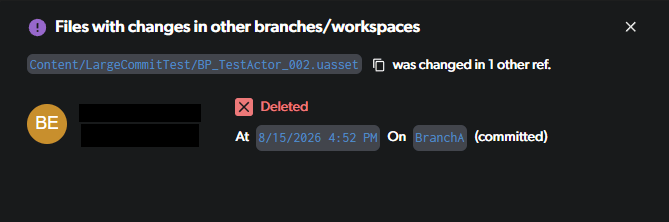
The indicator flags files that have been changed somewhere else in the repository — uncommitted edits in another workspace, or commits on another branch.
In the **desktop and web app**, a badge appears next to the file in the tree view.
 Click the badge to see what changed, who changed it, and where.
 In **Unreal Engine**, opening an asset someone else is editing shows a confirmation prompt instead. You can confirm and keep going, or [turn the prompts off](/unreal/unreal-engine-plugin#disable-soft-lock-warnings).
If the badge shows up on a large number of files at once, the usual cause is a single workspace holding a lot of uncommitted changes — see [Merge conflict warning](/basic/working-in-parallel#merge-conflict-warning).
## What happens when two people edit the same file
Because a soft lock does not block anyone, two people can edit the same file at once and Diversion reconciles the difference afterwards. This is the sequence when both are on the same branch:
User A modifies `Level.umap`. Nothing is reserved, and the file stays writable for everyone.
A warning icon appears on that file for everyone else on the branch, and clicking it shows that User A is editing.
Nothing blocks them. There is no checkout to wait on, and nobody to chase for a release.
User B's version becomes the latest on the branch.
With Auto-Update on (the default), that commit flows into User A's workspace. Because User A has uncommitted changes to the same file, Diversion does not overwrite them: it saves User A's local version alongside the original as `Level.dv-conflict.umap`, and puts User B's committed version at the original path. This is a [sync conflict](/concepts/conflicts#sync-conflicts).
User A compares the two versions and decides what to keep, then deletes the `.dv-conflict` file. See [Resolving sync conflicts](/concepts/conflicts#resolving-sync-conflicts) for the full procedure.
If the two users are on **separate branches**, nothing happens until someone merges. The conflict surfaces in the merge conflict window instead, where you choose the incoming version, the current version, or a combination of both — see [Merge conflicts](/basic/working-in-parallel#merge-conflicts).
**Neither version is lost in either case.** The version that does not win is preserved — as a `.dv-conflict` backup on the same branch, or in the other branch's history after a merge. The trade Diversion makes is that you settle the difference after the fact instead of being blocked up front.
## Soft locks and binary files
Text files can be merged line by line, so a conflict on one is usually a small cleanup. Binary assets such as `.umap`, `.uasset`, and `.fbx` cannot be merged — one version has to win, and the other person's work has to be redone. The exception is Blueprints, which can be merged with the [Unreal plugin](/unreal/ue-plugin-merge-conflicts).
This makes the soft lock indicator most valuable on exactly those files. Treat it as a prompt to talk to your teammate before starting, rather than something to resolve afterwards.
If that is not reliable enough for your team, [Hard Locks](/hard-locks) block the second commit outright and can lock matching files automatically by extension. Hard locks are available on **Studio** and **Enterprise** plans.
In **Unreal Engine**, opening an asset someone else is editing shows a confirmation prompt instead. You can confirm and keep going, or [turn the prompts off](/unreal/unreal-engine-plugin#disable-soft-lock-warnings).
If the badge shows up on a large number of files at once, the usual cause is a single workspace holding a lot of uncommitted changes — see [Merge conflict warning](/basic/working-in-parallel#merge-conflict-warning).
## What happens when two people edit the same file
Because a soft lock does not block anyone, two people can edit the same file at once and Diversion reconciles the difference afterwards. This is the sequence when both are on the same branch:
User A modifies `Level.umap`. Nothing is reserved, and the file stays writable for everyone.
A warning icon appears on that file for everyone else on the branch, and clicking it shows that User A is editing.
Nothing blocks them. There is no checkout to wait on, and nobody to chase for a release.
User B's version becomes the latest on the branch.
With Auto-Update on (the default), that commit flows into User A's workspace. Because User A has uncommitted changes to the same file, Diversion does not overwrite them: it saves User A's local version alongside the original as `Level.dv-conflict.umap`, and puts User B's committed version at the original path. This is a [sync conflict](/concepts/conflicts#sync-conflicts).
User A compares the two versions and decides what to keep, then deletes the `.dv-conflict` file. See [Resolving sync conflicts](/concepts/conflicts#resolving-sync-conflicts) for the full procedure.
If the two users are on **separate branches**, nothing happens until someone merges. The conflict surfaces in the merge conflict window instead, where you choose the incoming version, the current version, or a combination of both — see [Merge conflicts](/basic/working-in-parallel#merge-conflicts).
**Neither version is lost in either case.** The version that does not win is preserved — as a `.dv-conflict` backup on the same branch, or in the other branch's history after a merge. The trade Diversion makes is that you settle the difference after the fact instead of being blocked up front.
## Soft locks and binary files
Text files can be merged line by line, so a conflict on one is usually a small cleanup. Binary assets such as `.umap`, `.uasset`, and `.fbx` cannot be merged — one version has to win, and the other person's work has to be redone. The exception is Blueprints, which can be merged with the [Unreal plugin](/unreal/ue-plugin-merge-conflicts).
This makes the soft lock indicator most valuable on exactly those files. Treat it as a prompt to talk to your teammate before starting, rather than something to resolve afterwards.
If that is not reliable enough for your team, [Hard Locks](/hard-locks) block the second commit outright and can lock matching files automatically by extension. Hard locks are available on **Studio** and **Enterprise** plans.