> ## Documentation Index
> Fetch the complete documentation index at: https://docs.diversion.dev/llms.txt
> Use this file to discover all available pages before exploring further.
# CI/CD
> Configure your CI/CD platform to use diversion
## Generate an API Token
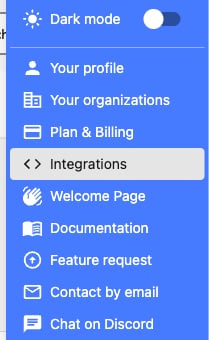
Click on your avatar and select *Integrations*.
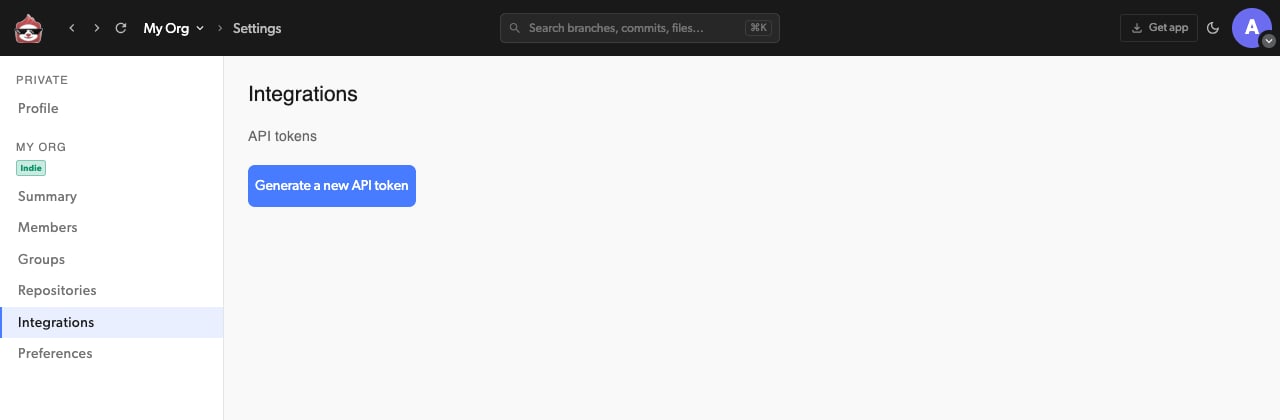
 A new window will open. Click the *Generate a new API token* button.
 Provide your login credentials, if prompted.
You'll be redirected to your new API Token.
Provide your login credentials, if prompted.
You'll be redirected to your new API Token.
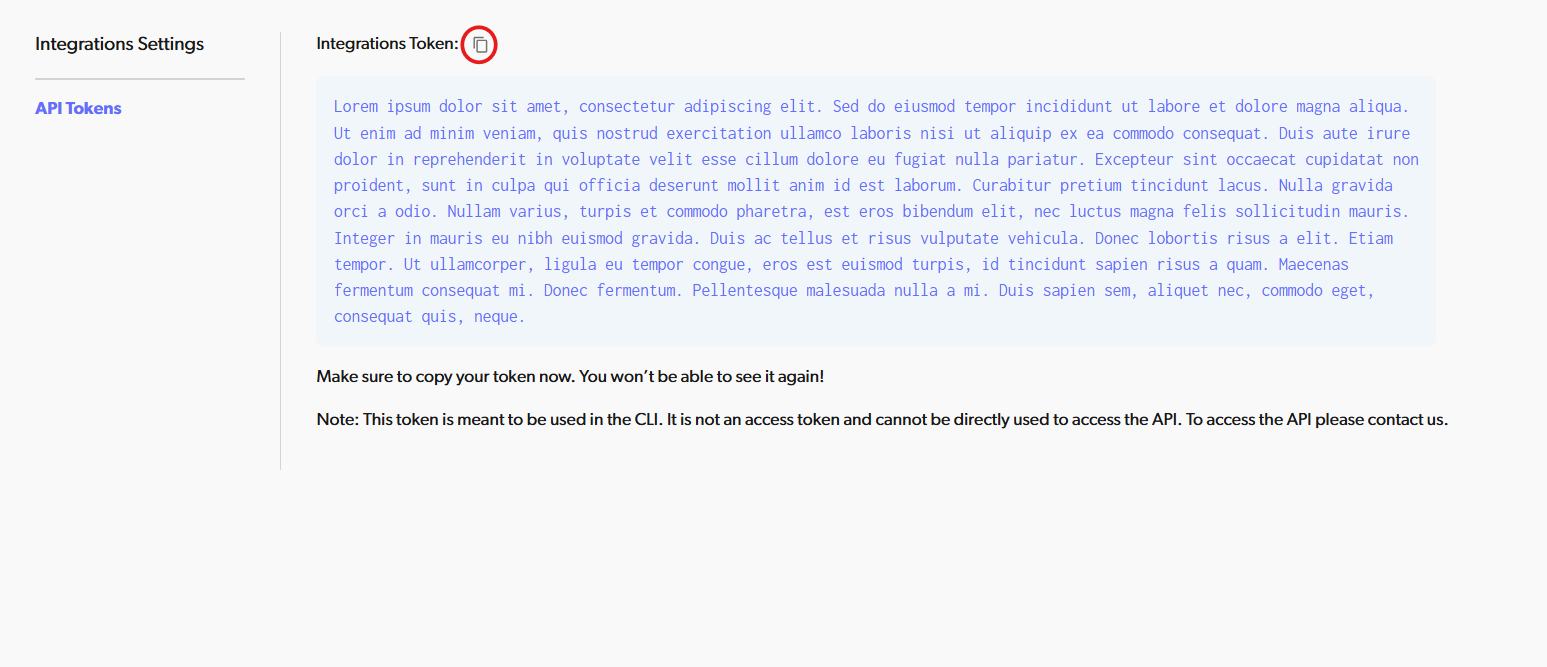 Use the *Copy* icon to copy the token and store it in a secure place.
This is the only time you'll see the token here and there will be no way to retrieve it later.
If you lose it, you will have to revoke all your API tokens and regenerate new ones.
## Set up your CI/CD platform
Store it as an environment variable named `USER_POOL_CLIENT_ID` with the value `j084768v4hd6j1pf8df4h4c47`.
Use the *Copy* icon to copy the token and store it in a secure place.
This is the only time you'll see the token here and there will be no way to retrieve it later.
If you lose it, you will have to revoke all your API tokens and regenerate new ones.
## Set up your CI/CD platform
Store it as an environment variable named `USER_POOL_CLIENT_ID` with the value `j084768v4hd6j1pf8df4h4c47`.
It will be read and used by the `dv` client in the workflow.
Here are some relevant docs for storing environment variables in popular CI/CD platforms:
* [Jenkins ](https://www.jenkins.io/doc/pipeline/tour/environment/)
* [CircleCI ](https://circleci.com/docs/set-environment-variable/#set-an-environment-variable-in-a-project)
* [TravisCI ](https://docs.travis-ci.com/user/environment-variables/)
* [TeamCity ](https://www.jetbrains.com/help/teamcity/typed-parameters.html#How+to+Create+a+New+Parameter)
* [Bitrise ](https://devcenter.bitrise.io/en/builds/environment-variables.html)
Don't store the API Token as a plain environment variable! If your CI/CD platform provides a secure
secret storage, use it.
Here are some relevant docs for storing secrets in popular CI/CD platforms:
* [Jenkins ](https://www.jenkins.io/doc/developer/security/secrets/#storing-secrets-on-disk)
* [CircleCI ](https://circleci.com/docs/security-recommendations/)
* [TravisCI ](https://docs.travis-ci.com/user/environment-variables/#defining-variables-in-repository-settings)
* [TeamCity ](https://www.jetbrains.com/help/teamcity/hashicorp-vault.html)
* [Bitrise ](https://devcenter.bitrise.io/en/builds/secrets.html)
If your platform doesn't support secure secrets handling, you can use external secret handling tools:
* [Hashicorp Vault ](https://www.vaultproject.io/) (has a plugin for TeamCity)
* [Akeyless ](https://docs.akeyless.io/docs/akeyless-overview) (has a plugin for TeamCity)
* [Azure Key Vault ](https://azure.microsoft.com/en-us/products/key-vault) (has a plugin for TeamCity)
* [Google Secret Manager ](https://cloud.google.com/security/products/secret-manager)
* [AWS Secrets Manager ](https://aws.amazon.com/secrets-manager/)
## Create a build step in your CI/CD workflow
### Install the Diversion client, authenticate it and clone your repo
In your CI/CD step editor or `yml` file, create a new *Shell* build step with the following content:
```bash Mac/Linux theme={null}
# Download Diversion client
curl -sL https://get.diversion.dev/unix | bash ; export PATH="$HOME/.diversion/bin:$PATH"
# Start the Diversion agent in the background and wait for it to start
dv --agent --bkg
sleep 2
# Authenticate Diversion
dv authenticate $API_TOKEN
# Clone your repository and wait for sync to complete
dv clone -new-workspace my-repository
cd my-repository
dv status
```
```powershell Windows theme={null}
# Download Diversion client
. ([Scriptblock]::Create((([System.Text.Encoding]::ASCII).getString((Invoke-WebRequest -Uri "https://get.diversion.dev/win-ci").Content))))
# Start the Diversion agent in the background and wait for it to start
dv --agent --bkg
Start-Sleep -Seconds 2
# Authenticate Diversion
dv authenticate $API_TOKEN
# Clone your repository and wait for sync to complete
dv clone -new-workspace my-repository
cd my-repository
dv status
```
Replace `$API_TOKEN` with the appropriate way to reference your secret from the secure storage.
Consult your platform's docs and the secure storage docs.
Replace `my-repository` with the name of your repository.
`dv status` will block until all the files are downloaded. This is important before starting to work.
It will also output the workspace ID if you want to reuse it for the next runs or view it in the web app.
`-new-workspace` will create a new workspace for each run of the CI/CD workflow. Passing a workspace argument here
is important, or else the clone command will prompt for user input and block. See `dv help clone` for details.
## Add the rest of your CI/CD workflow
That's it. You're all set to use your Diversion repo in your CI/CD workflow. You can also use any CLI commands you would
use with `dv` when running locally.
## A Jenkins example
Be sure to replace the placeholders with your actual values. Also note that this syntax is for a Windows node, so you may need to adjust it for your specific setup.
```groovy theme={null}
pipeline
{
agent
{
any
}
environment
{
USER_POOL_CLIENT_ID = "j084768v4hd6j1pf8df4h4c47"
DV_WORKSPACE = "" //Found in Diversion using 'dv workspace' command
DV_REPO = "" //Your repository name
}
stages
{
stage('Sync Repository')
{
steps
{
script
{
// Checking if Diversion CLI is installed and installing from API if not
if (!fileExists("${USERPROFILE}\\.diversion\\bin\\dv.exe"))
{
echo "Diversion not installed at ${USERPROFILE}\\.diversion\\bin\\dv.exe, installing..."
powershell 'iwr https://get.diversion.dev/win-ci | iex'
}
//Authenticating Diversion CLI
withCredentials([string(credentialsId: '', variable: 'API_TOKEN')]) //Insert your credential ID found in Jenkins Credentials
{
echo "Diversion CLI installed, authenticating..."
bat "dv authenticate %API_TOKEN%"
}
//Cloning repository if it is not already cloned
if (!fileExists("${WORKSPACE}\\${DV_REPO}\\.diversion"))
{
echo "Diversion authenticated, empty folder found, cloning repository..."
bat "dv clone ${DV_REPO} -workspace ${DV_WORKSPACE}"
}
//Pulling latest changes if repository is already cloned
else
{
echo "Diversion repository already cloned, pulling latest changes..."
bat "cd ${WORKSPACE}\\${DV_REPO} && dv update"
}
//Displaying status of repository until tasks complete (so we do not start more tasks until it is done)
bat "cd ${WORKSPACE}\\${DV_REPO} && dv status"
}
}
}
}
}
```