> ## Documentation Index
> Fetch the complete documentation index at: https://docs.diversion.dev/llms.txt
> Use this file to discover all available pages before exploring further.
# Choosing Your Plan
> Choose and manage Diversion's subscription plans
For detailed information about Diversion's available plans, visit our [pricing page](https://www.diversion.dev/pricing).
## How do I select a tier?
You can select a tier if you haven't yet selected one and meet one of the following criteria:
* You are an organization owner
* You are not a member of any organization
**Note:** If you are an organization member but not the owner and wish to select a tier, you can [create an organization](/basic/organization-management).
### Steps to select a tier
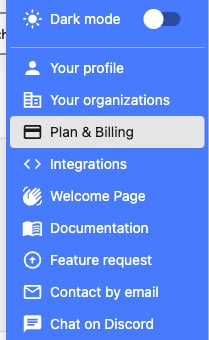
1. Click on your avatar and select **Plan & Billing**
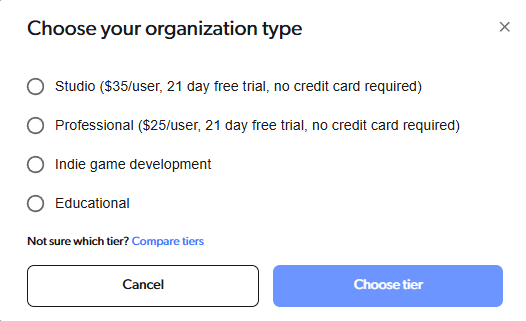
 2. Select your desired tier. For Educational and Indie tiers, you'll be directed to a form to verify your eligibility.
 3. After selecting your tier, navigate back to **Plan & Billing** to add users and storage space. You'll be redirected to the billing page where you can adjust these settings.
## How do I change my tier?
To change your tier, contact our [support team](mailto:support@diversion.dev) with your request:
* **Professional tier:** Our support team will assist you with the upgrade process.
* **Educational tier:** Provide an updated enrollment letter from your educational institution.
* **Indie tier:** Provide a short description of your project along with your request.
Once your request is approved, you can select the new tier following the steps above. For Indie and Educational tiers, you'll need to complete an eligibility form.
## My trial has ended, what's next?
3. After selecting your tier, navigate back to **Plan & Billing** to add users and storage space. You'll be redirected to the billing page where you can adjust these settings.
## How do I change my tier?
To change your tier, contact our [support team](mailto:support@diversion.dev) with your request:
* **Professional tier:** Our support team will assist you with the upgrade process.
* **Educational tier:** Provide an updated enrollment letter from your educational institution.
* **Indie tier:** Provide a short description of your project along with your request.
Once your request is approved, you can select the new tier following the steps above. For Indie and Educational tiers, you'll need to complete an eligibility form.
## My trial has ended, what's next?
 After your trial ends, you need to select a tier. Until you do:
* You and your team can continue using Professional tier features
* You'll receive [system messages](/system-messages) about plan limitations
* Eventually, you'll lose write access to your resources (unable to commit)
To maintain full access, select a tier as soon as possible.
## I'm not the organization owner, but I keep receiving plan [system messages](/system-messages). What should I do?
After your trial ends, you need to select a tier. Until you do:
* You and your team can continue using Professional tier features
* You'll receive [system messages](/system-messages) about plan limitations
* Eventually, you'll lose write access to your resources (unable to commit)
To maintain full access, select a tier as soon as possible.
## I'm not the organization owner, but I keep receiving plan [system messages](/system-messages). What should I do?
 Only organization owners can select tiers and manage subscriptions. Contact your organization owner and ask them to:
* Select an appropriate tier for the organization
* Update the current subscription if needed
## I submitted an Indie/Educational tier application. When will it be approved?
The approval process typically takes about one week. During this period:
* You can use the tier you selected
* Ensure all required files and information are uploaded
* If your request is denied, our team will contact you within a week
If you don't hear from us after a week, your request has been approved.
Our team may move users to a different tier if they no longer meet the Indie/Educational terms agreed to in the form. We'll always notify you before making any changes.
## Indie form FAQ
### Company
No worries — just state your current work status. For example: Unemployed, Freelance, or Part-time at \[Name of Company].
That's completely fine, just state it as-is. Your current occupation won't affect your submission or its approval.
This helps us confirm the Indie plan is the right fit. It's designed for independent creators and small teams, so we use this context to keep it fair for everyone.
### LinkedIn URL
No problem — you can submit a link to any social profile related to your game development project instead (e.g., Twitter/X, itch.io, GitHub, etc.).
We use it to verify that the details you've provided match your profile. It's a quick check on our end to ensure everything is accurate before approving your submission.
### Game / Studio Name
You can use a temporary name, or simply describe the genre of your project — for example: "1st-person roguelite shooter". Something is better than nothing!
Submit "N/A" or "Solo Developer" — whichever best describes your situation.
Unfortunately, your submission won't be approved. The Indie subscription is specifically for active game development projects. Video projects, "for hire" dev work, and training simulations are not eligible.
## Can I replace collaborators on Diversion without upgrading my plan?
Yes, as long as the total number of collaborators stays within your plan's limits, there's no need to upgrade. Simply remove the old collaborators and add the new ones to maintain access under your current plan.
Only organization owners can select tiers and manage subscriptions. Contact your organization owner and ask them to:
* Select an appropriate tier for the organization
* Update the current subscription if needed
## I submitted an Indie/Educational tier application. When will it be approved?
The approval process typically takes about one week. During this period:
* You can use the tier you selected
* Ensure all required files and information are uploaded
* If your request is denied, our team will contact you within a week
If you don't hear from us after a week, your request has been approved.
Our team may move users to a different tier if they no longer meet the Indie/Educational terms agreed to in the form. We'll always notify you before making any changes.
## Indie form FAQ
### Company
No worries — just state your current work status. For example: Unemployed, Freelance, or Part-time at \[Name of Company].
That's completely fine, just state it as-is. Your current occupation won't affect your submission or its approval.
This helps us confirm the Indie plan is the right fit. It's designed for independent creators and small teams, so we use this context to keep it fair for everyone.
### LinkedIn URL
No problem — you can submit a link to any social profile related to your game development project instead (e.g., Twitter/X, itch.io, GitHub, etc.).
We use it to verify that the details you've provided match your profile. It's a quick check on our end to ensure everything is accurate before approving your submission.
### Game / Studio Name
You can use a temporary name, or simply describe the genre of your project — for example: "1st-person roguelite shooter". Something is better than nothing!
Submit "N/A" or "Solo Developer" — whichever best describes your situation.
Unfortunately, your submission won't be approved. The Indie subscription is specifically for active game development projects. Video projects, "for hire" dev work, and training simulations are not eligible.
## Can I replace collaborators on Diversion without upgrading my plan?
Yes, as long as the total number of collaborators stays within your plan's limits, there's no need to upgrade. Simply remove the old collaborators and add the new ones to maintain access under your current plan.