> ## Documentation Index
> Fetch the complete documentation index at: https://docs.diversion.dev/llms.txt
> Use this file to discover all available pages before exploring further.
# Tags
> Mark releases, milestones, and builds by tagging commits in Diversion
## What are Tags?
Tags are named labels that point to a specific commit. Use them to mark the commits that matter - a release, a milestone, a build that passed QA - so you and your team can find them later.
Unlike branches, tags don't move. Once created, a tag always references the same commit. You can rename a tag or update its description, but it keeps pointing at the commit you tagged.
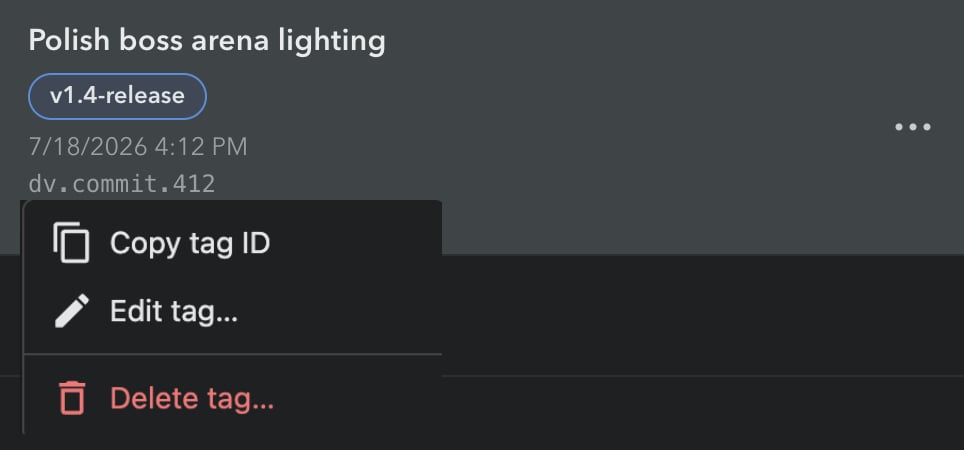
In the desktop app's commits list, a commit's tags appear as chips under its message. You can manage tags from the desktop app, the [CLI](/cmd-ref/tag), or the [API](/api-reference/repository-tag-manipulation/list-tags).
## Creating a Tag
1. **Open your repository in the desktop app**
* Go to the **Commits** view and find the commit you want to tag
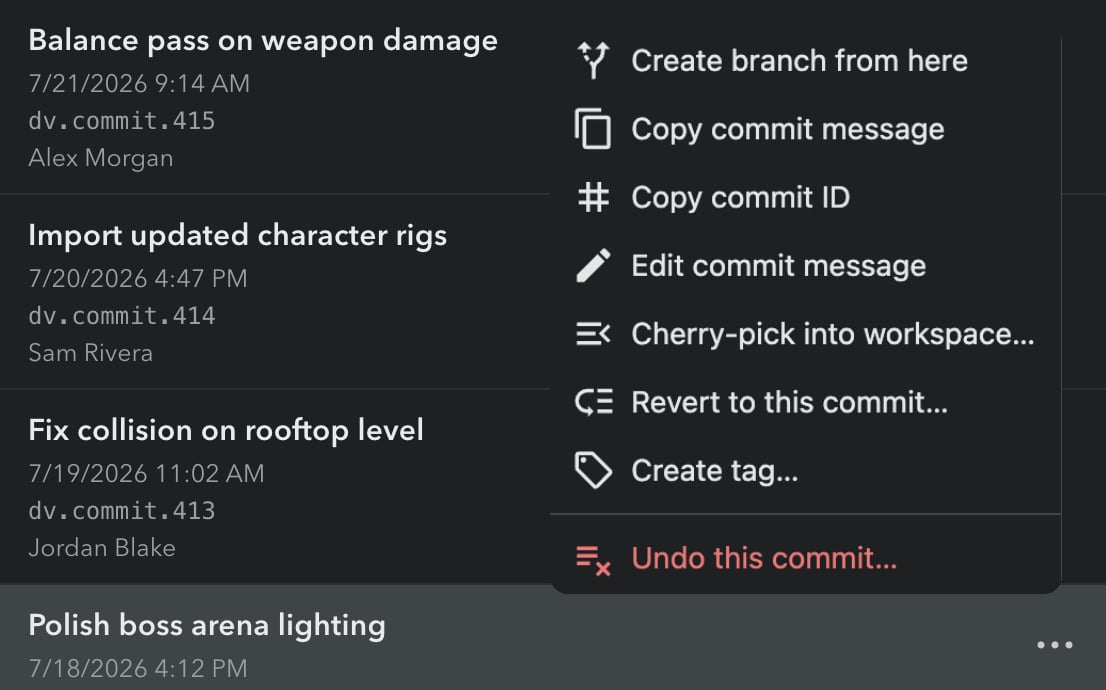
2. **Open the commit's menu**
* Click the menu icon (⋯) that appears on the commit row
* Select **"Create tag..."**
 3. **Enter a tag name**
* The name is validated as you type - see [Tag name rules](#tag-name-rules) below
* Optionally add a description (up to 1024 characters)
3. **Enter a tag name**
* The name is validated as you type - see [Tag name rules](#tag-name-rules) below
* Optionally add a description (up to 1024 characters)
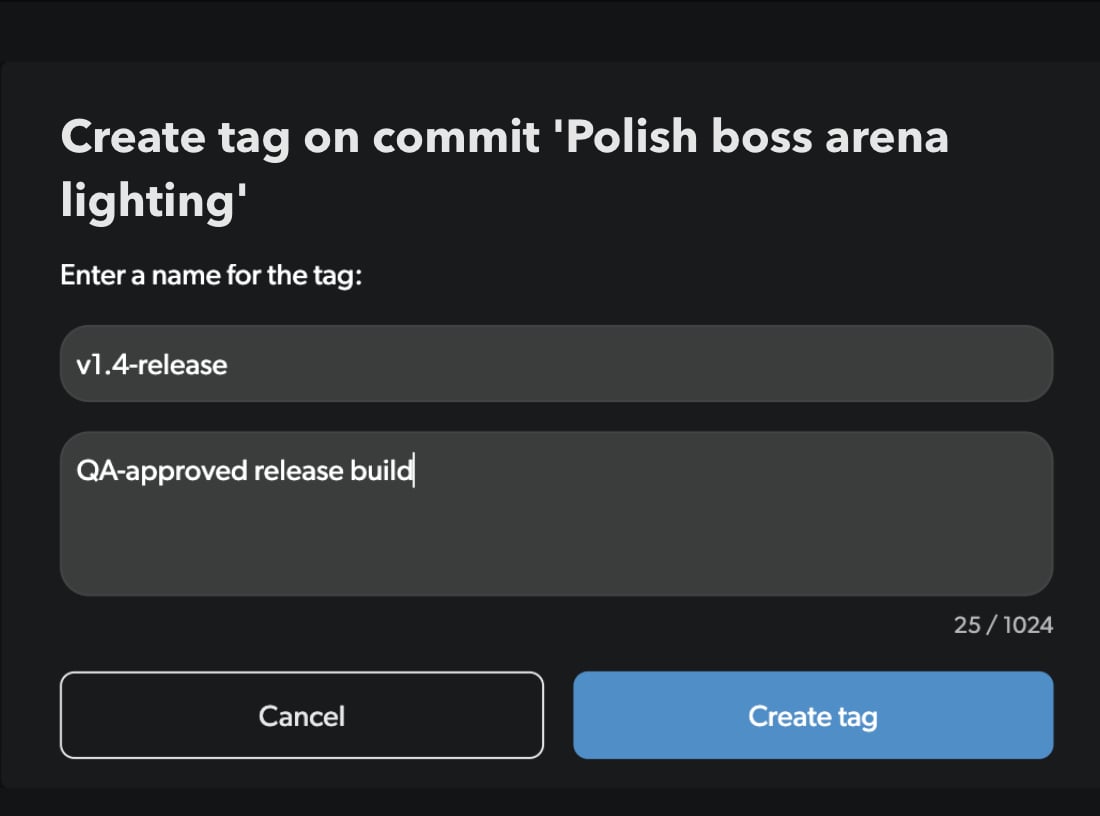 4. **Click "Create tag"**
* The new tag appears on the commit immediately
## Copying a Tag ID
CLI and API tag operations take the tag ID, not the tag name. To grab it:
1. **Click the tag's chip** in the commits list
2. **Select "Copy tag ID"** - the ID is copied to your clipboard
4. **Click "Create tag"**
* The new tag appears on the commit immediately
## Copying a Tag ID
CLI and API tag operations take the tag ID, not the tag name. To grab it:
1. **Click the tag's chip** in the commits list
2. **Select "Copy tag ID"** - the ID is copied to your clipboard
 ## Editing a Tag
1. **Click the tag's chip** and select **"Edit tag..."**
2. **Change the name or description** - the dialog opens prefilled with the current values, and the same validation as create applies
3. **Click "Save"**
Editing changes the tag's name or description only; the tag keeps pointing at the same commit.
## Deleting a Tag
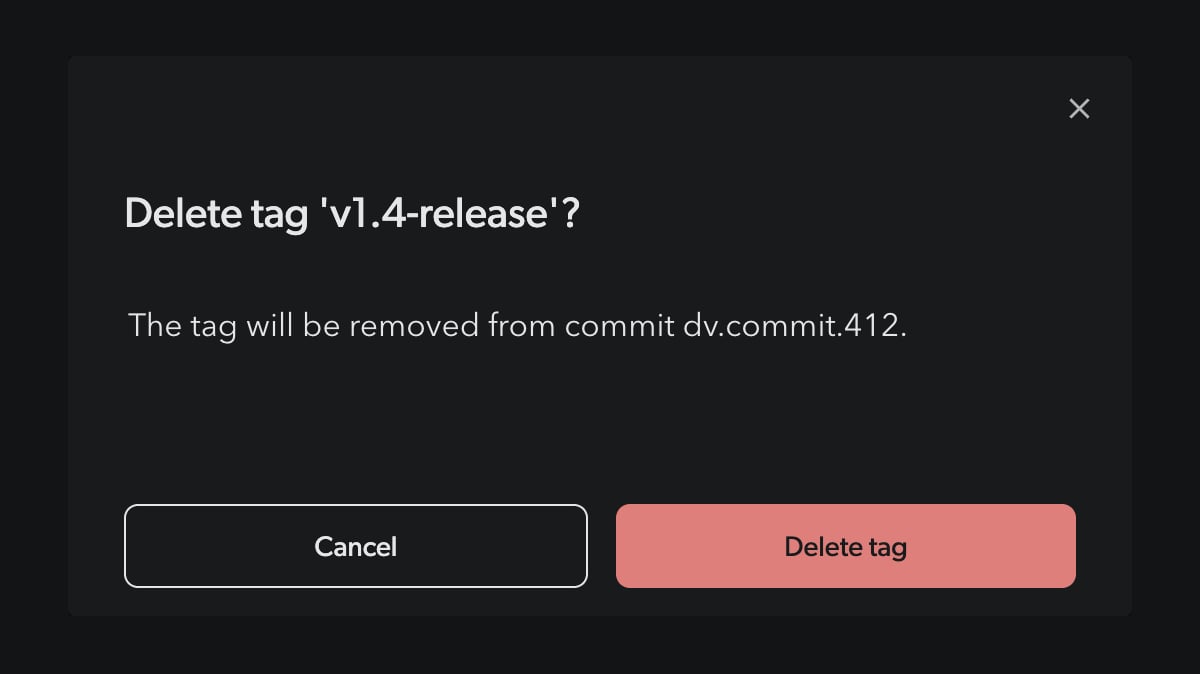
1. **Click the tag's chip** and select **"Delete tag..."**
2. **Confirm the deletion** in the dialog
## Editing a Tag
1. **Click the tag's chip** and select **"Edit tag..."**
2. **Change the name or description** - the dialog opens prefilled with the current values, and the same validation as create applies
3. **Click "Save"**
Editing changes the tag's name or description only; the tag keeps pointing at the same commit.
## Deleting a Tag
1. **Click the tag's chip** and select **"Delete tag..."**
2. **Confirm the deletion** in the dialog
 ## Tag Name Rules
* Names can contain letters, numbers, and the characters `.` `-` `_` `/` (no spaces)
* Names are limited to 128 characters; descriptions to 1024 characters
* Tag names must be unique within the repository
If a Git sync is in progress on the repository, tag operations may briefly fail with a "sync in progress" error - wait a moment and retry.
## Using Tags from the CLI
```bash theme={null}
# List tags
dv tag
# Create a tag on the current commit
dv tag -c v1.4-release -a "QA-approved release build"
# Delete a tag by ID
dv tag -d
```
See the [`dv tag` reference](/cmd-ref/tag) for all options, or the [Tags API](/api-reference/repository-tag-manipulation/list-tags) for automation.
## Tag Name Rules
* Names can contain letters, numbers, and the characters `.` `-` `_` `/` (no spaces)
* Names are limited to 128 characters; descriptions to 1024 characters
* Tag names must be unique within the repository
If a Git sync is in progress on the repository, tag operations may briefly fail with a "sync in progress" error - wait a moment and retry.
## Using Tags from the CLI
```bash theme={null}
# List tags
dv tag
# Create a tag on the current commit
dv tag -c v1.4-release -a "QA-approved release build"
# Delete a tag by ID
dv tag -d
```
See the [`dv tag` reference](/cmd-ref/tag) for all options, or the [Tags API](/api-reference/repository-tag-manipulation/list-tags) for automation.