> ## Documentation Index
> Fetch the complete documentation index at: https://docs.diversion.dev/llms.txt
> Use this file to discover all available pages before exploring further.
# Start using Diversion in your project
> Create a new Diversion repo for a completely new project or an existing one
You're working on a project. How exciting!
What you want is a Diversion repository. Let's get you set up:
You can do this with [our Unreal Engine plugin](/unreal/unreal-engine-plugin)!
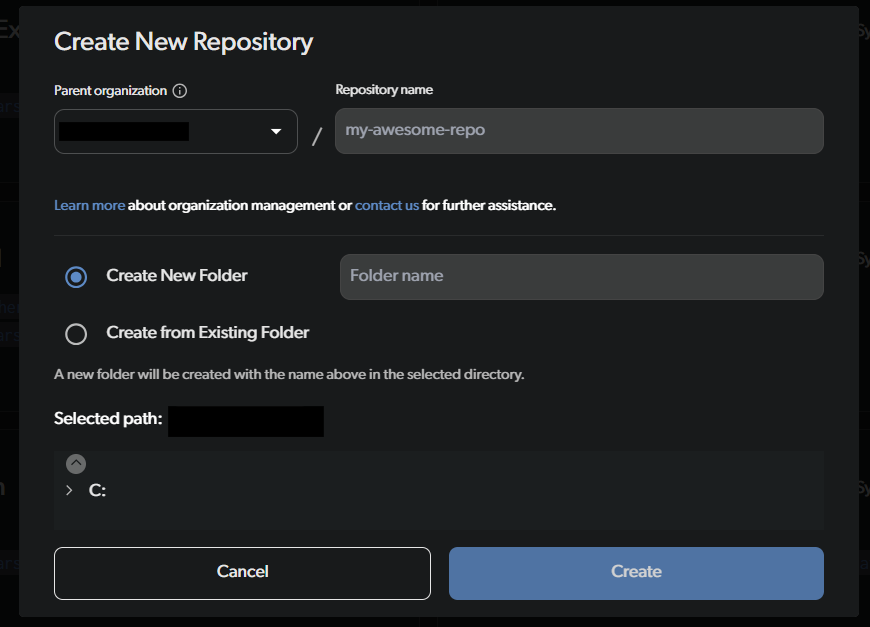
In the desktop app, click on the `New repository` button on the top right.
 You can create a new folder or use an existing one. If you have a game-engine project, you probably want to choose its root folder.
For this example I'll create a new folder, but the other steps work the same either way.
I'll select `Create New Folder`and call it `CreatingNewRepo`.
You can create a new folder or use an existing one. If you have a game-engine project, you probably want to choose its root folder.
For this example I'll create a new folder, but the other steps work the same either way.
I'll select `Create New Folder`and call it `CreatingNewRepo`.
 A new repo is created in the folder you specified! The workspace's **Sync** toggle shows it's syncing - the status text reads something like "Syncing: Scan in progress" while it uploads the folder's content to our cloud.
In this example it's an empty folder so it should only take a moment. If you create a new repo for an existing project, it might take a bit longer.
A new repo is created in the folder you specified! The workspace's **Sync** toggle shows it's syncing - the status text reads something like "Syncing: Scan in progress" while it uploads the folder's content to our cloud.
In this example it's an empty folder so it should only take a moment. If you create a new repo for an existing project, it might take a bit longer.
 Once the sync status shows the workspace is fully synced, you're all set!
 And that's it! You have a new repository. Anything you do in the directory will be tracked by Diversion.
If there are files you don't want tracked (e.g. build artifacts, temporary files), you can use a [.dvignore file](/basic/dvignore) to exclude them.
## What's next?
* [Manage project access](/basic/manage-project-access) — invite collaborators to your repo
And that's it! You have a new repository. Anything you do in the directory will be tracked by Diversion.
If there are files you don't want tracked (e.g. build artifacts, temporary files), you can use a [.dvignore file](/basic/dvignore) to exclude them.
## What's next?
* [Manage project access](/basic/manage-project-access) — invite collaborators to your repo