> ## Documentation Index
> Fetch the complete documentation index at: https://docs.diversion.dev/llms.txt
> Use this file to discover all available pages before exploring further.
# Delete your account
> Permanently delete your Diversion account
You can delete your Diversion account yourself from the **Profile** page. Diversion will check whether your account is safe to delete, show you exactly what you'll lose, cancel any active subscription, and remove your data.
Deleting your account is permanent. All repositories you own are deleted along with their history, branches, and workspaces. Any active subscription is cancelled. This cannot be undone.
## Switching login methods
If your real goal is to switch sign-in methods (e.g., from email/password to Google), see the FAQ: [I can't log in with Google / I can't log in with my password](/faqs#i-cant-log-in-with-google--i-cant-log-in-with-my-password). Switching currently requires deleting your account and signing up again with the new method, so back up or transfer any owned repositories first.
## What gets deleted
When your account is deleted, Diversion:
* Permanently deletes every repository you own (including history, branches, workspaces, and stored files).
* Cancels any active subscription tied to your account and removes you from Stripe.
* Removes you from every organization and shared repository you collaborate on -- the resources themselves stay, but you lose access.
* Disables your login credentials (email/password or Google).
* Revokes any pending invitations sent from your account.
Repositories owned by other people are unaffected; only your access is revoked.
Your local files are **not** deleted. Workspace folders already on your computer stay on disk as plain files -- they simply stop syncing with Diversion. Delete them manually if you no longer want them (see [After deletion](#after-deletion)).
## Open the delete account dialog
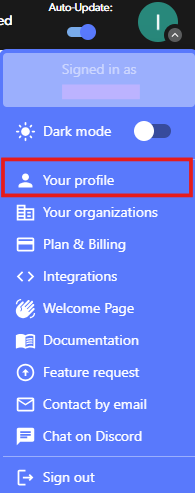
Click your avatar in the top navigation and select **Your profile**.
 The **Danger zone** section is at the bottom of the Profile page.
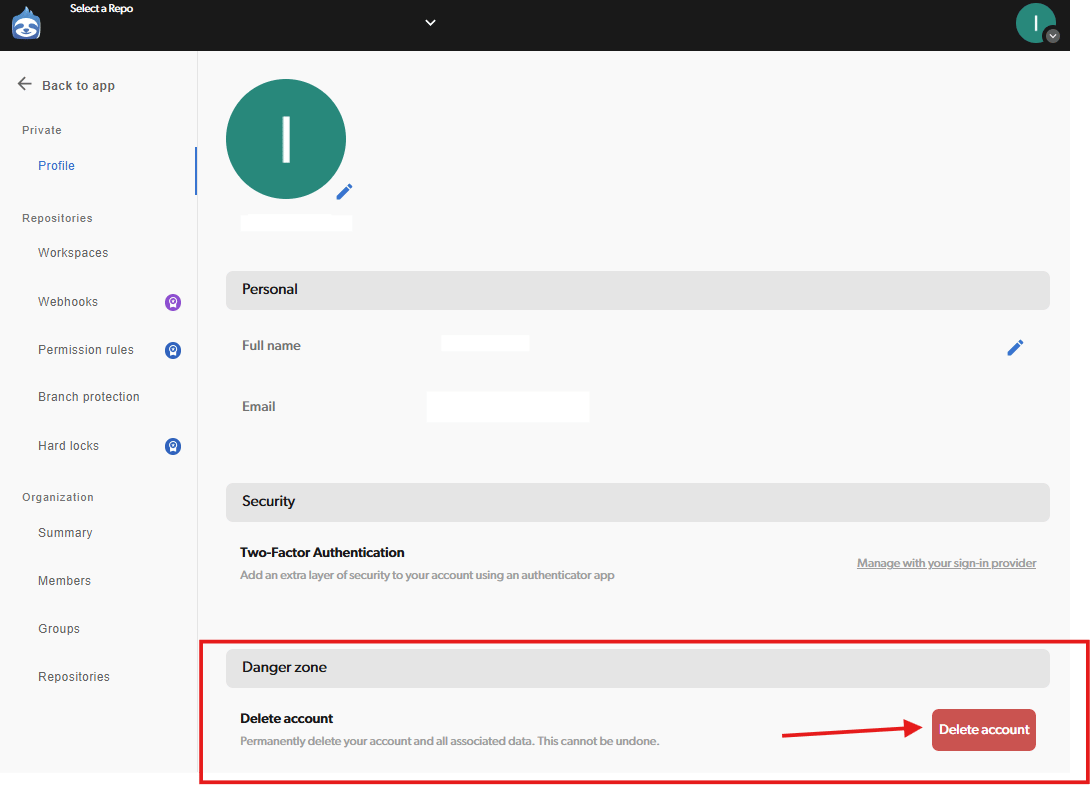 This opens the deletion wizard. Diversion immediately checks whether your account can be deleted.
## Resolve blockers (if any)
Some account states block deletion until you fix them. If Diversion finds a blocker, the dialog lists what to resolve -- you cannot proceed until each item is cleared.
### "Repositories you own in other organizations"
You own one or more repositories outside the blocking organization that have other collaborators. Either:
* [Delete the repository](/basic/repo-management#deleting-a-repository) (if it's no longer needed), or
* Remove every other collaborator from the repository -- see [Manage project access](/basic/manage-project-access).
This opens the deletion wizard. Diversion immediately checks whether your account can be deleted.
## Resolve blockers (if any)
Some account states block deletion until you fix them. If Diversion finds a blocker, the dialog lists what to resolve -- you cannot proceed until each item is cleared.
### "Repositories you own in other organizations"
You own one or more repositories outside the blocking organization that have other collaborators. Either:
* [Delete the repository](/basic/repo-management#deleting-a-repository) (if it's no longer needed), or
* Remove every other collaborator from the repository -- see [Manage project access](/basic/manage-project-access).
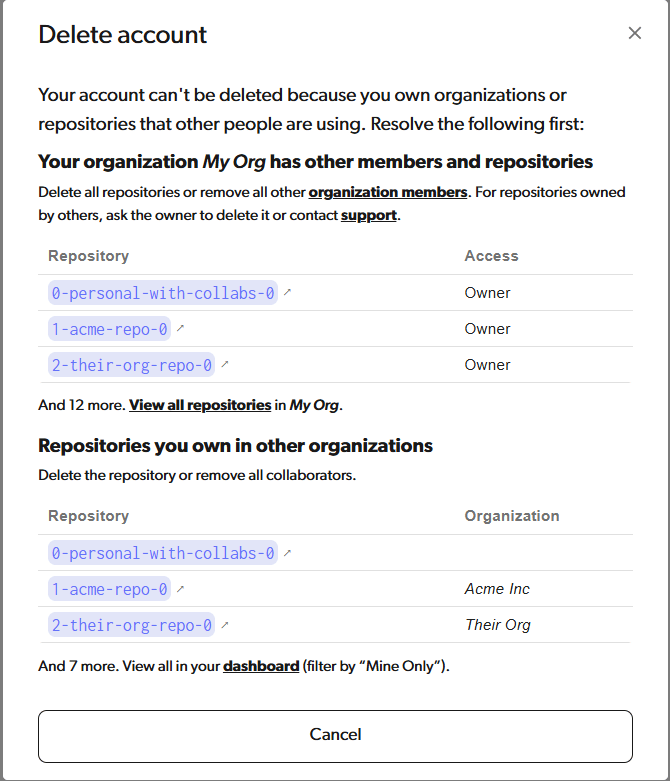 ### "Your organization has other members and repositories"
You own an organization that has both repositories **and** other members. Resolve it by clearing one side: either remove every repository from the organization, or remove every other member.
To clear the repositories, for each one:
* [Delete the repository](/basic/repo-management#deleting-a-repository) (if it's no longer needed), or
* [Transfer the repository to another organization](/basic/organization-management#transferring-a-repository-to-another-organization).
To clear members instead, remove every other member from the organization -- see [Organization management](/basic/organization-management#removing-users).
For repositories in the organization that are owned by other users, ask the owner to delete or transfer them, or [contact support](mailto:support@diversion.dev).
### "Your organization has other members and repositories"
You own an organization that has both repositories **and** other members. Resolve it by clearing one side: either remove every repository from the organization, or remove every other member.
To clear the repositories, for each one:
* [Delete the repository](/basic/repo-management#deleting-a-repository) (if it's no longer needed), or
* [Transfer the repository to another organization](/basic/organization-management#transferring-a-repository-to-another-organization).
To clear members instead, remove every other member from the organization -- see [Organization management](/basic/organization-management#removing-users).
For repositories in the organization that are owned by other users, ask the owner to delete or transfer them, or [contact support](mailto:support@diversion.dev).
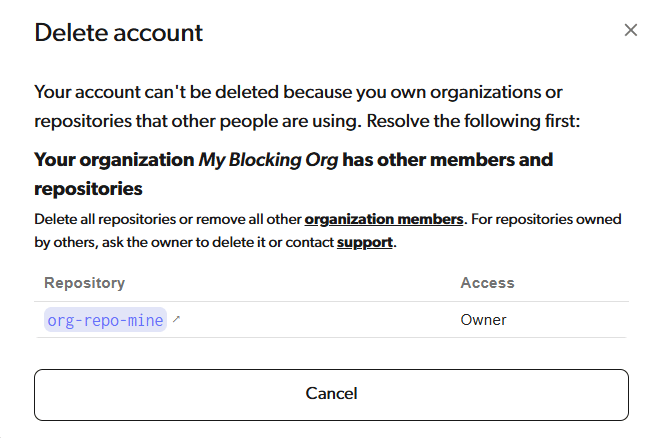 After resolving the blockers, close the dialog and open it again -- Diversion re-checks on each open.
## Review what you'll lose
If your account has no blockers but you still own or belong to repositories or organizations, the dialog shows a **step 1 of 2** review screen listing everything affected by deletion: repositories and organizations you own (which will be deleted) and ones you're a member of (which you'll lose access to).
After resolving the blockers, close the dialog and open it again -- Diversion re-checks on each open.
## Review what you'll lose
If your account has no blockers but you still own or belong to repositories or organizations, the dialog shows a **step 1 of 2** review screen listing everything affected by deletion: repositories and organizations you own (which will be deleted) and ones you're a member of (which you'll lose access to).
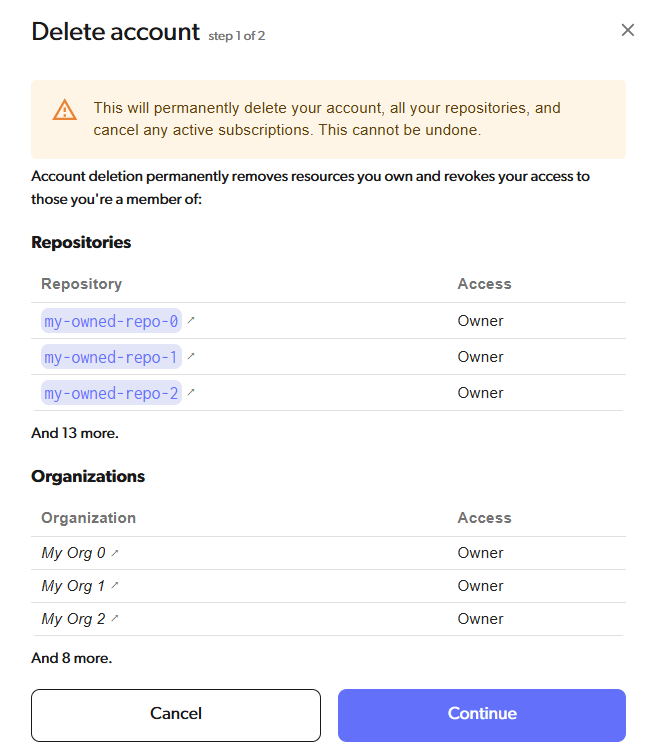 Review the list carefully. Anything you want to keep, transfer, or back up should be handled before continuing:
* Clone repositories you own to a local folder if you want to keep a copy of the files.
* Use **Transfer ownership** to hand a repository to a collaborator instead of deleting it -- see [Transferring repository ownership](/basic/organization-management#transferring-repository-ownership).
Click **Continue** when you're ready to proceed.
## Confirm and delete
The final step asks you to pick a reason for leaving, optionally leave feedback, and type your email to confirm.
Pick a reason and optionally add feedback (up to 255 characters; for longer notes, email [support@diversion.dev](mailto:support@diversion.dev)).
Review the list carefully. Anything you want to keep, transfer, or back up should be handled before continuing:
* Clone repositories you own to a local folder if you want to keep a copy of the files.
* Use **Transfer ownership** to hand a repository to a collaborator instead of deleting it -- see [Transferring repository ownership](/basic/organization-management#transferring-repository-ownership).
Click **Continue** when you're ready to proceed.
## Confirm and delete
The final step asks you to pick a reason for leaving, optionally leave feedback, and type your email to confirm.
Pick a reason and optionally add feedback (up to 255 characters; for longer notes, email [support@diversion.dev](mailto:support@diversion.dev)).
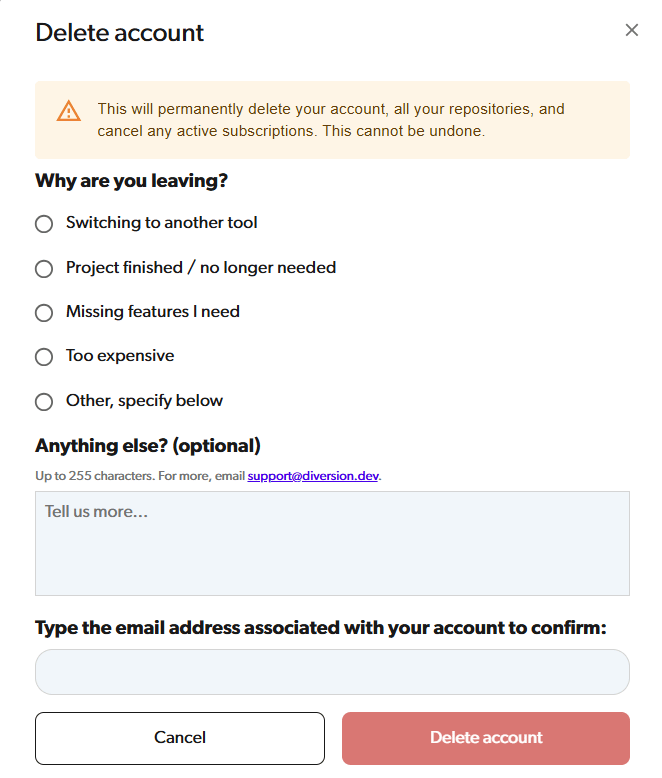 Type the email address associated with your Diversion account exactly. The **Delete account** button stays disabled until the email matches.
Diversion deletes your repositories, cancels your subscription, removes your login, and signs you out. You're redirected to the sign-in page.
## After deletion
* Logging in with the deleted email no longer works on the web or desktop apps.
* Any local workspace folders on your machine remain on disk as plain files but no longer sync with Diversion. Delete them manually if you no longer need them.
* The deleted email address can be used to register a new account later. The new account starts fresh; previously deleted data is not recoverable.
Type the email address associated with your Diversion account exactly. The **Delete account** button stays disabled until the email matches.
Diversion deletes your repositories, cancels your subscription, removes your login, and signs you out. You're redirected to the sign-in page.
## After deletion
* Logging in with the deleted email no longer works on the web or desktop apps.
* Any local workspace folders on your machine remain on disk as plain files but no longer sync with Diversion. Delete them manually if you no longer need them.
* The deleted email address can be used to register a new account later. The new account starts fresh; previously deleted data is not recoverable.