> ## Documentation Index
> Fetch the complete documentation index at: https://docs.diversion.dev/llms.txt
> Use this file to discover all available pages before exploring further.
# Branch Protection
> Prevent direct commits to important branches and require changes to be merged in
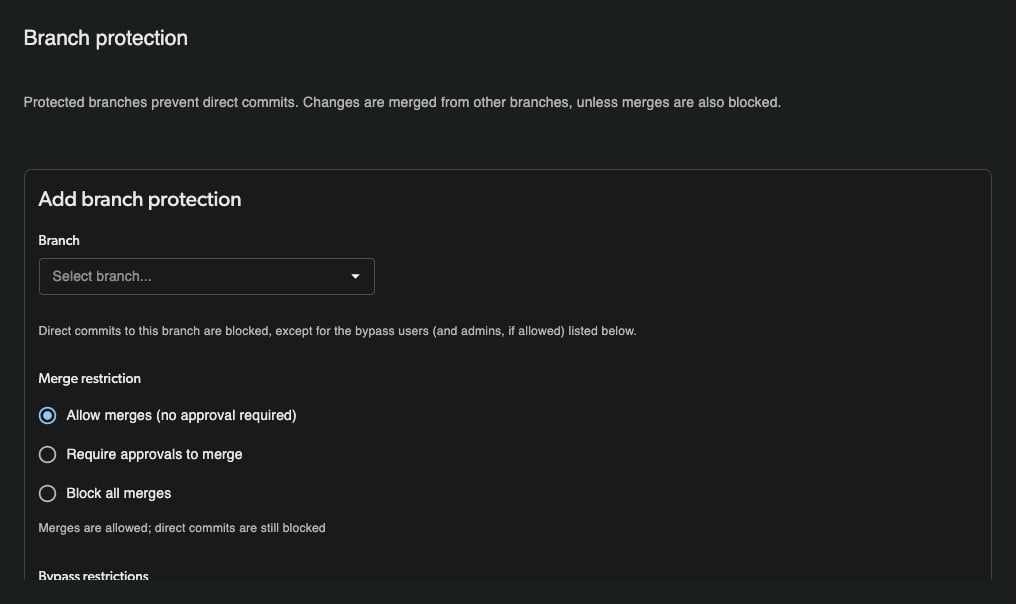
Branch protection lets you safeguard important branches—such as your main branch or release branches—by blocking direct commits. Once a branch is protected, changes can no longer be committed to it directly; they must be made on another branch and merged in.
Branch protection is available to all users at no additional cost.
 ## What Protection Does
When a branch is protected:
* **Direct commits are blocked.** Users cannot commit changes straight to the protected branch.
* **Changes must be merged in.** To update a protected branch, make your changes on a separate branch and merge that branch into the protected one.
* **Admins can optionally bypass.** You can allow administrators—or a specific list of users—to commit directly, bypassing the protection.
Branch protection currently enforces that changes arrive through a merge. A requirement that merges first pass review or approval is on the roadmap and is **not yet enforced**. This page will be updated when that capability ships.
## Adding a Protection Rule
Click your **profile avatar** in the top navigation and select **Your organizations**. In the settings sidebar, select **Repositories**, then select **Branch protection** in the repository column.
Check the repository picker at the top of the repository column and make sure the correct repository is selected before continuing.
Click **Add protection rule**.
Under **Add branch protection**, open the **Branch** dropdown and choose the branch you want to protect.
## What Protection Does
When a branch is protected:
* **Direct commits are blocked.** Users cannot commit changes straight to the protected branch.
* **Changes must be merged in.** To update a protected branch, make your changes on a separate branch and merge that branch into the protected one.
* **Admins can optionally bypass.** You can allow administrators—or a specific list of users—to commit directly, bypassing the protection.
Branch protection currently enforces that changes arrive through a merge. A requirement that merges first pass review or approval is on the roadmap and is **not yet enforced**. This page will be updated when that capability ships.
## Adding a Protection Rule
Click your **profile avatar** in the top navigation and select **Your organizations**. In the settings sidebar, select **Repositories**, then select **Branch protection** in the repository column.
Check the repository picker at the top of the repository column and make sure the correct repository is selected before continuing.
Click **Add protection rule**.
Under **Add branch protection**, open the **Branch** dropdown and choose the branch you want to protect.
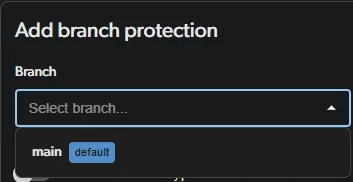 Under **Merge restriction**, choose how changes reach the branch: allow merges, require approvals to merge, or block all merges.
Then choose who, if anyone, is allowed to commit directly to the protected branch:
* **Allow admins to bypass** — toggle this on to let repository administrators commit directly. When off, the helper text reads *"Admins cannot bypass protection."*
* **Bypass restrictions (optional)** — use the **Select users…** dropdown to add specific users who can bypass protection and commit directly to this branch.
Leave both options untouched to enforce protection for everyone, including admins.
Under **Merge restriction**, choose how changes reach the branch: allow merges, require approvals to merge, or block all merges.
Then choose who, if anyone, is allowed to commit directly to the protected branch:
* **Allow admins to bypass** — toggle this on to let repository administrators commit directly. When off, the helper text reads *"Admins cannot bypass protection."*
* **Bypass restrictions (optional)** — use the **Select users…** dropdown to add specific users who can bypass protection and commit directly to this branch.
Leave both options untouched to enforce protection for everyone, including admins.
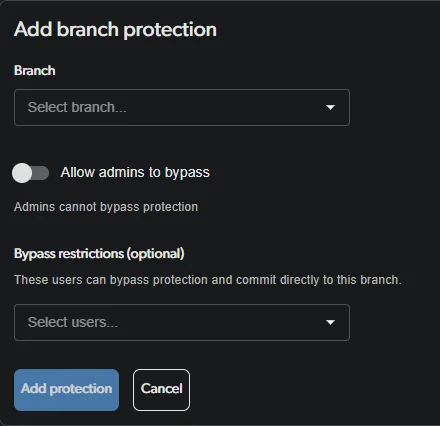 Click **Add protection**. The branch is now protected.
## Managing Existing Rules
Each existing rule lists the protected branch, its bypass status (for example, *"No bypass allowed"*), and any **Allowed users** who can commit directly. Use the **pencil** icon to edit a rule or the **trash** icon to delete it.
### Removing a Protection Rule
To stop protecting a branch, go back to **Branch protection** (profile avatar → **Your organizations** → **Repositories** → **Branch protection**) and make sure the correct repository is selected in the repository picker. Find the rule for that branch and click the **trash** icon to delete it. Direct commits to the branch are allowed again immediately.
Click **Add protection**. The branch is now protected.
## Managing Existing Rules
Each existing rule lists the protected branch, its bypass status (for example, *"No bypass allowed"*), and any **Allowed users** who can commit directly. Use the **pencil** icon to edit a rule or the **trash** icon to delete it.
### Removing a Protection Rule
To stop protecting a branch, go back to **Branch protection** (profile avatar → **Your organizations** → **Repositories** → **Branch protection**) and make sure the correct repository is selected in the repository picker. Find the rule for that branch and click the **trash** icon to delete it. Direct commits to the branch are allowed again immediately.
