> ## Documentation Index
> Fetch the complete documentation index at: https://docs.diversion.dev/llms.txt
> Use this file to discover all available pages before exploring further.
# Resolve Conflicts with AI
> Let AI propose a resolution for text files with merge conflicts, then review it before you complete the merge.
When a merge, update, or revert has conflicts in text files, AI can resolve them for you. For each file, AI reads both versions, the version they started from, and the commit messages on both sides. Then it writes a merged file that keeps the intent of both changes, and it explains what it kept.
You stay in control: in the Diversion app, nothing is committed until you review the result and click **Complete merge**.
Resolving conflicts with AI is available on **Professional**, **Studio**, and **Enterprise** plans, and during a trial.
## Resolve conflicts in the Diversion app
Start the merge as usual (see [Working in parallel](/basic/working-in-parallel#how-to-merge)). If there are conflicts, the conflict screen opens.
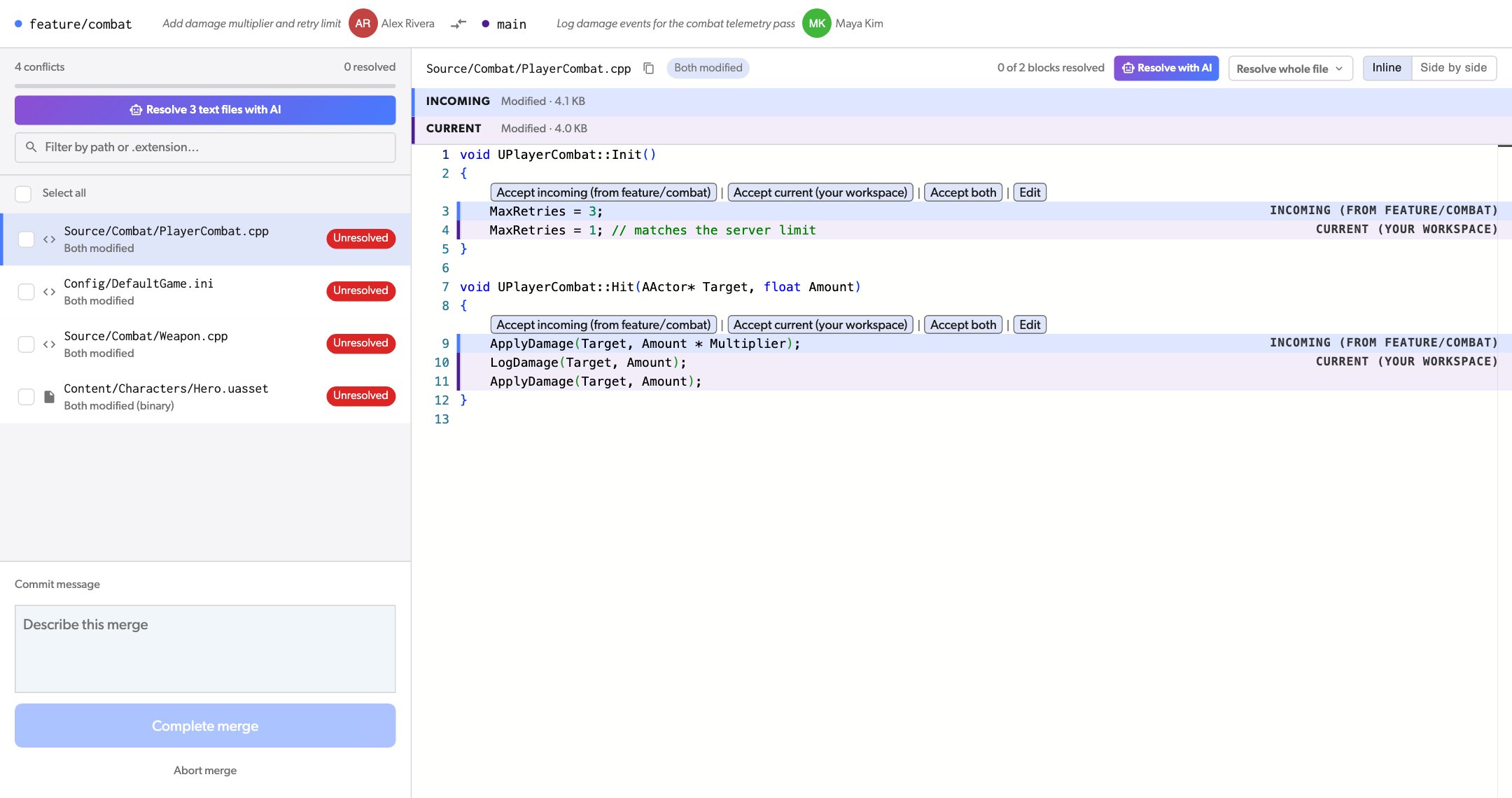
* To resolve one file, select it and click **Resolve with AI** above the file.
* To resolve many files, click **Resolve N text files with AI** above the file list. To pick only some files, tick their checkboxes first.
Resolve related files in one request: AI sees the conflicts in all the files of a request, so it can keep the changes consistent across them.
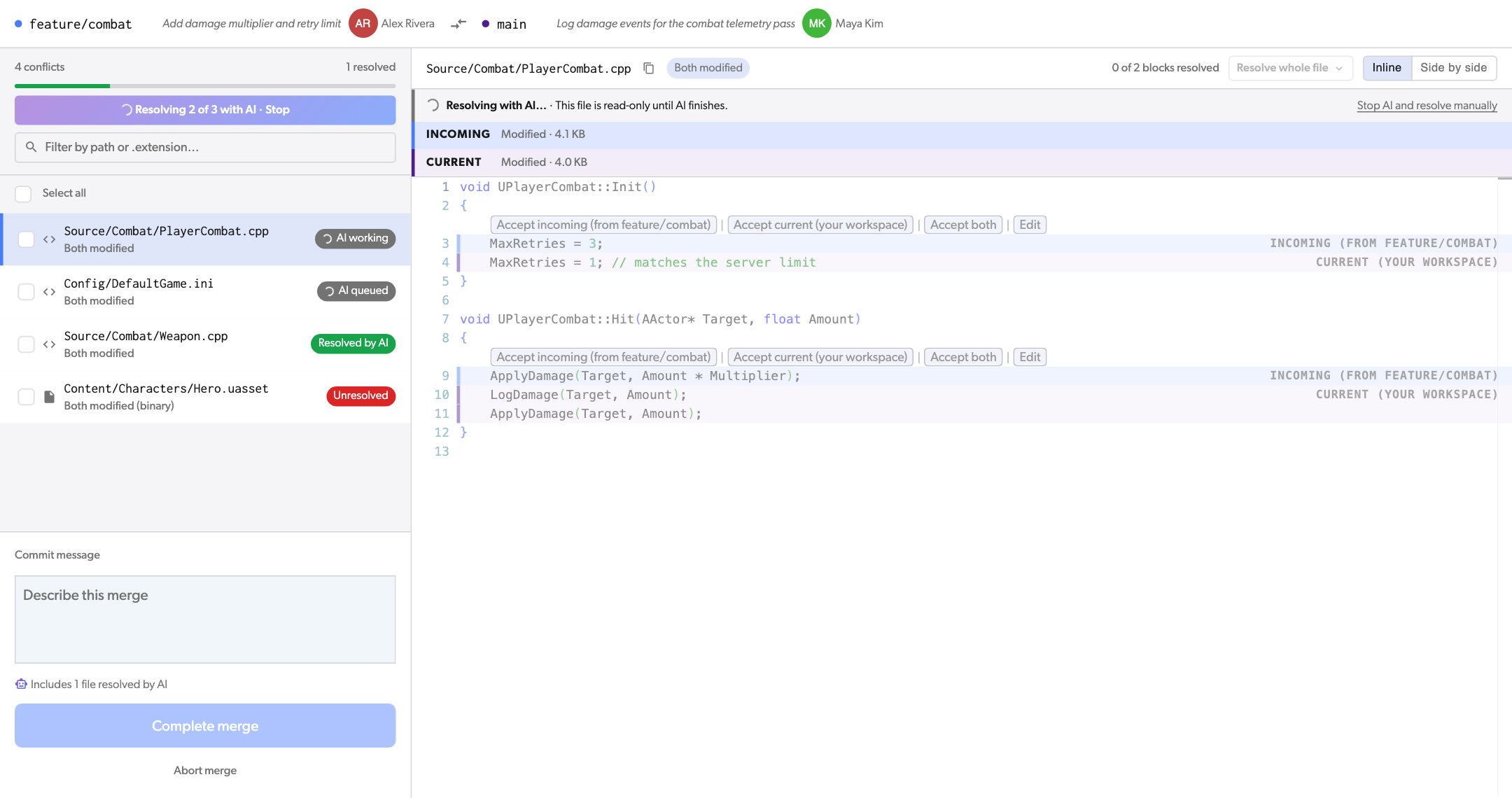
 Each file shows **AI queued** or **AI working**. A file is read-only while AI works on it. You can keep resolving other files in the meantime.
To stop, click **Stop** above the file list, or **Stop AI and resolve manually** above the file.
Each file shows **AI queued** or **AI working**. A file is read-only while AI works on it. You can keep resolving other files in the meantime.
To stop, click **Stop** above the file list, or **Stop AI and resolve manually** above the file.
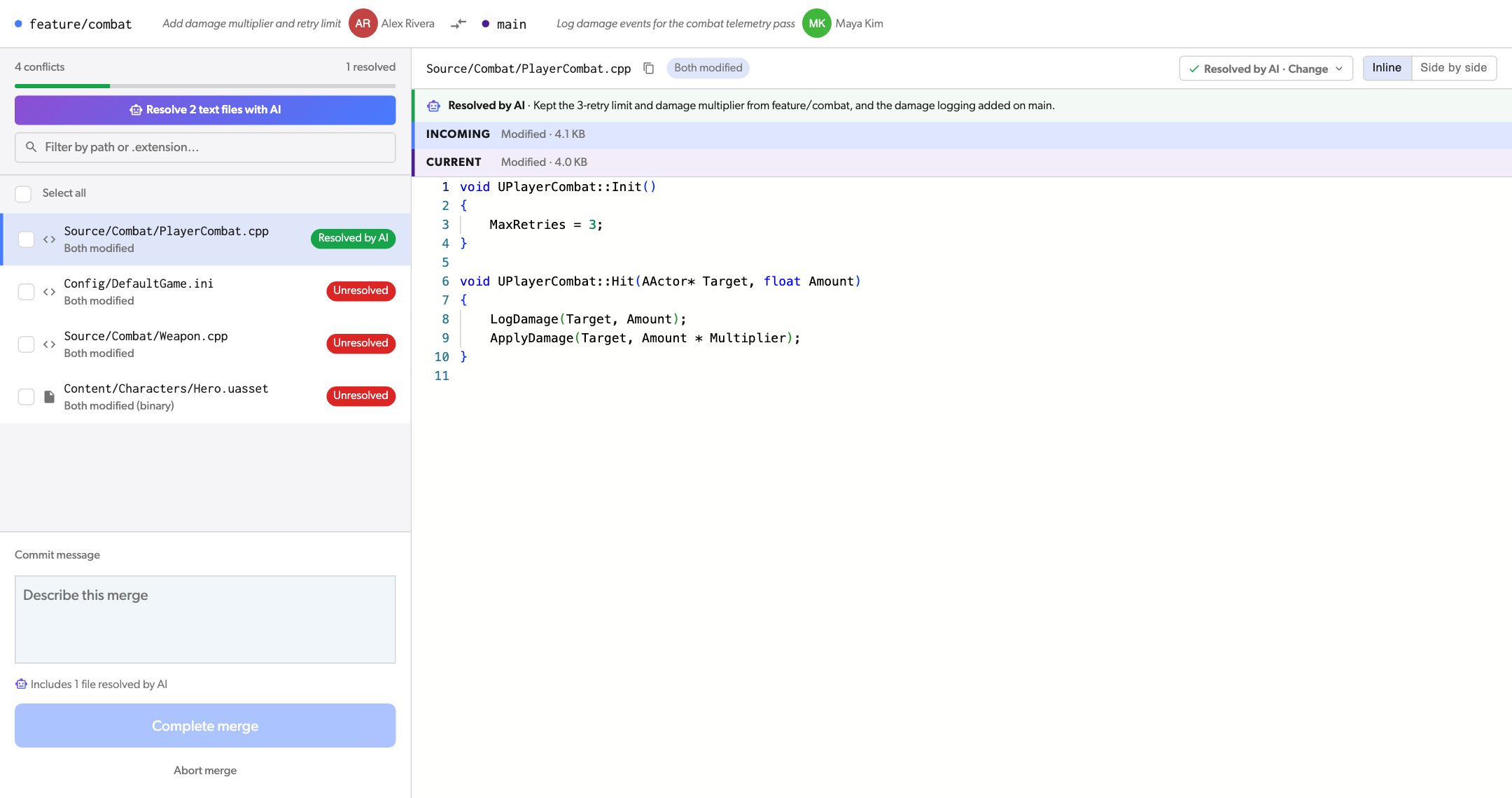
 A resolved file shows **Resolved by AI** and a short reason for the result. Read the merged file.
If you do not agree with the result, open **Resolved by AI · Change** to choose a side or go back to the conflict, or edit the file.
A resolved file shows **Resolved by AI** and a short reason for the result. Read the merged file.
If you do not agree with the result, open **Resolved by AI · Change** to choose a side or go back to the conflict, or edit the file.
 Resolve any files that are left, type a commit message, and click **Complete merge**. The footer shows how many files AI resolved.
### When AI cannot resolve a file
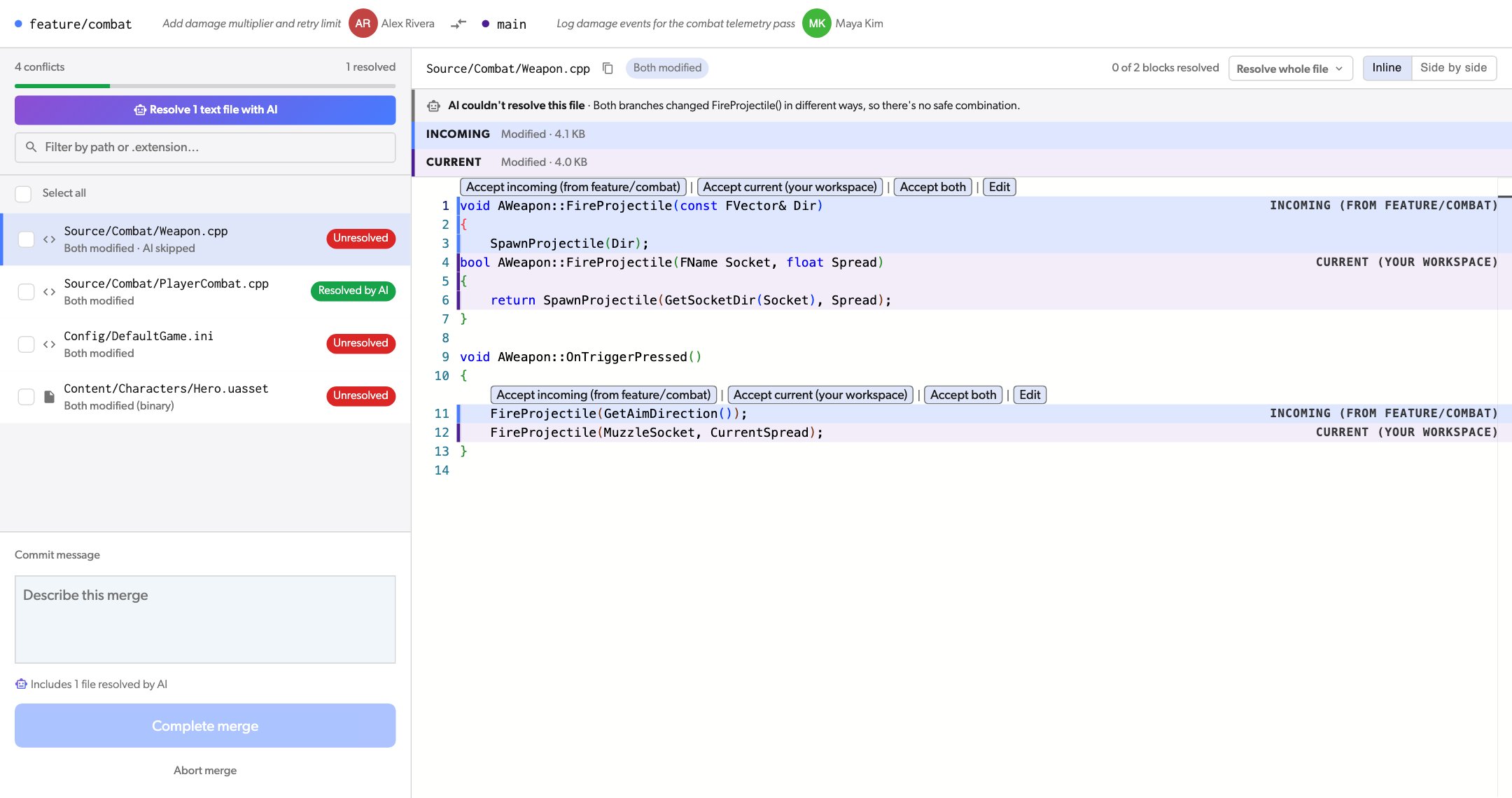
Sometimes the two changes cannot be combined safely, for example when both branches changed the same function in different ways. Then the file shows **AI couldn't resolve this file** and the reason. The file stays unresolved, and you resolve it yourself.
Resolve any files that are left, type a commit message, and click **Complete merge**. The footer shows how many files AI resolved.
### When AI cannot resolve a file
Sometimes the two changes cannot be combined safely, for example when both branches changed the same function in different ways. Then the file shows **AI couldn't resolve this file** and the reason. The file stays unresolved, and you resolve it yourself.
 If you already changed a file and then ask AI to resolve it, Diversion asks before AI replaces your changes.
## Resolve conflicts from the CLI
Add `--conflict_resolution ai` to `merge`, `update`, or `revert`:
```bash theme={null}
dv merge --conflict_resolution ai
```
1. Diversion first merges what it can on the server.
2. AI resolves the text files that still have conflicts, and the CLI shows its progress.
3. If AI resolves every conflict, Diversion completes the merge and creates the commit.
4. If some conflicts are left, the merge stays open. The CLI lists them and prints a link to finish the merge in the Diversion app. The files AI resolved stay resolved.
From the CLI, the merge completes without a review step when AI resolves every conflict. To review each result first, use the Diversion app, or check the merge commit after it is created.
To stop waiting, press `Ctrl+C`. AI keeps working on the server, and you can finish the merge in the app.
## Plans and limits
* **Plans:** Professional, Studio, and Enterprise, and during a trial.
* **Text files only:** AI skips binary files, such as images, models, and `.uasset` files, and Unity YAML files, such as scenes and prefabs. For these, choose a side or use an [external merge tool](/advanced/external-merge-tools).
* **Both sides need the file:** if one side deleted the file, or two different files were moved to the same path, you choose which version to keep.
* **File size:** 256 KB or less on both sides. For a larger file, AI shows that the file is too large, and you resolve it yourself.
* **Files at a time:** up to 50. For a merge with more files, click the button again after the first files are done. The CLI does this for you.
* **Usage limit:** each organization has a usage limit for AI. If your organization reaches it, AI shows "The AI token budget is used up for now. Try again later." The limit resets after a few hours.
## Your data
AI runs only when someone on your team asks it to resolve conflicts. Diversion then sends the conflicting files and their commit messages to a trusted third-party AI provider, through Diversion. You do not need your own API key.
This documentation is built and hosted on [Mintlify](https://mintlify.com), a developer documentation platform.
If you already changed a file and then ask AI to resolve it, Diversion asks before AI replaces your changes.
## Resolve conflicts from the CLI
Add `--conflict_resolution ai` to `merge`, `update`, or `revert`:
```bash theme={null}
dv merge --conflict_resolution ai
```
1. Diversion first merges what it can on the server.
2. AI resolves the text files that still have conflicts, and the CLI shows its progress.
3. If AI resolves every conflict, Diversion completes the merge and creates the commit.
4. If some conflicts are left, the merge stays open. The CLI lists them and prints a link to finish the merge in the Diversion app. The files AI resolved stay resolved.
From the CLI, the merge completes without a review step when AI resolves every conflict. To review each result first, use the Diversion app, or check the merge commit after it is created.
To stop waiting, press `Ctrl+C`. AI keeps working on the server, and you can finish the merge in the app.
## Plans and limits
* **Plans:** Professional, Studio, and Enterprise, and during a trial.
* **Text files only:** AI skips binary files, such as images, models, and `.uasset` files, and Unity YAML files, such as scenes and prefabs. For these, choose a side or use an [external merge tool](/advanced/external-merge-tools).
* **Both sides need the file:** if one side deleted the file, or two different files were moved to the same path, you choose which version to keep.
* **File size:** 256 KB or less on both sides. For a larger file, AI shows that the file is too large, and you resolve it yourself.
* **Files at a time:** up to 50. For a merge with more files, click the button again after the first files are done. The CLI does this for you.
* **Usage limit:** each organization has a usage limit for AI. If your organization reaches it, AI shows "The AI token budget is used up for now. Try again later." The limit resets after a few hours.
## Your data
AI runs only when someone on your team asks it to resolve conflicts. Diversion then sends the conflicting files and their commit messages to a trusted third-party AI provider, through Diversion. You do not need your own API key.
This documentation is built and hosted on [Mintlify](https://mintlify.com), a developer documentation platform.